CALS HR offers resources and learning opportunities during second week of Open Enrollment
Open Enrollment is being held Oct. 5–30. Please submit your Open Enrollment elections by Oct. 23. The Office of Human Resources wants to ensure the bulk of your decisions are completed to avoid any potential submission issues. You can make updates through Oct. 30.
Visit the 2027 Benefits Open Enrollment website for information about changes for 2027 and monthly premiums.
Attend the Benefits 2027: What You Need to Know presentation.
- Oct. 12 Late Night, 11:00 p.m.–12:30 a.m., Health Sciences Learning Center
- Offered in English, Spanish, Hmong, Tibetan, Chinese, and Nepali
- Free parking in lots 60, 74, 82 and 64
- Oct. 14, 5:00–6:00 p.m., Join this event on Zoom
- Oct. 15, 12:00–1:00 p.m., Join this event on Zoom
- Oct. 16, 1:00–2:00 p.m., Join this event on Zoom
- Oct. 21, 3:00–4:00 p.m., Join this event on Zoom
The Office of Human Resources’ Benefits 2027: What You Need to Know 1-hour presentation is now available on YouTube.
Employee Trust Funds’ Vendor Forums are available for employees to learn and ask questions from the vendors you utilize for your benefits.
Request a 20-minute CALS Benefit Review virtual appointment by emailing hr@cals.wisc.edu. Appointments will be held the weeks of October 13 and October 19, Monday through Thursday. HR will review your benefits, answer questions and assist with enrollment. Please have your MIB login information available.
CALS Drop-in Sessions in Ag Hall, Room 205, will be held on October 13 and October 20 from 9:00 a.m.–2:00 p.m. HR will answer questions and assist with My Insurance Benefits (MIB) enrollment. Please bring your MIB login information.
Decide on Your 2027 Benefits
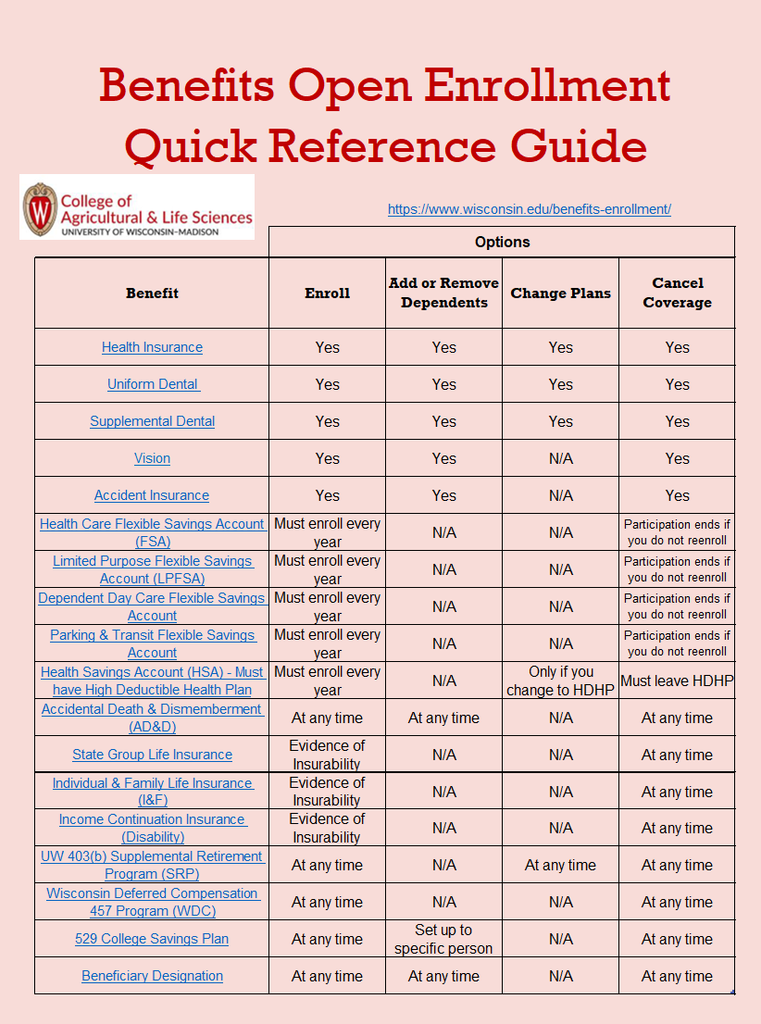
You must enroll every year if you want to start or continue these benefits:
- Medical Opt-Out Incentive
- Health Savings Account (HSA)
- Limited Purpose Flexible Spending Account (LPFSA)
- Health Care Flexible Spending Account (FSA)
- Dependent Day Care Flexible Spending Account (DCFSA)
Medical Opt-Out Incentive and Health Savings Account (HSA) are only available to employees eligible for Wisconsin Retirement System (WRS) benefits.
Health Care Flexible Spending Accounts (FSA) and Dependent Day Care Flexible Spending Accounts are not available to non-service appointees (Fellows, Scholars, Trainees, Post-Doctoral Fellows/Scholars, most Postdoctoral Trainees and Grad Interns/Trainees) and University Staff with Temporary appointments
You can enroll, change, or cancel:
- State Group Health Insurance with or without Uniform Dental (preventive dental)
- Preventive Dental (stand-alone plan available to those not enrolled in State Group Health)
- Supplemental Dental (major/restorative dental coverage only)
- Supplemental Vision
- Accident Plan
- Accidental Death and Dismemberment (AD&D) Insurance
Individual and Family Group Life Insurance
If you currently have coverage, during the benefits enrollment period (October 5 – October 30, 2026), you may:
- increase your employee coverage by up to $20,000 (up to the plan maximum of $300,000), without proof of good health);
- increase your spouse/domestic partner coverage by up to $10,000 and/or child coverage by $2,500 (up to plan maximums). The amount of spouse/domestic partner and child coverage may not exceed the amount of employee coverage;
- decrease or cancel coverage at any time.
If you increase your coverage by more than the allowed amount(s), your coverage will be adjusted to your previous coverage plus the allowed amount(s). If you have elected any amount(s) over the allowed amount(s), you will receive information on applying for coverage through Evidence of Insurability (approval not guaranteed).
If you currently have spouse/domestic partner and/or child coverage, be sure to review and update your spouse/domestic partner and child information during your enrollment sessions.
Your coverage will remain the same from 2026 to 2027 if you do not make any changes.
If you do not currently have coverage, you may apply for coverage through evidence of insurability. Approval is not guaranteed.
How to Enroll
You will need a My Benefits account to use the benefits enrollment system.
- Log into Workday, then go to Personal > Benefits and Pay > Suggested Links > My Benefits.
- Sign in to My Benefits using your MyWisconsin ID account.
- Log into My Insurance Benefits.
- Then, review your current benefits/dependents and enroll for the 2027 plan year.
The open enrollment period is October 5 – October 30, 2026. You must submit all 2027 benefits (including paper) by 4:30 pm on October 30, 2026.
NOTE: If you add your spouse or dependent children to your benefits, when you enroll, you will be asked to provide their full name, Social Security Number, date of birth, and documentation (marriage certificate for your spouse or birth/adoption certificates for your dependent children).
If you have any questions or would like to set up an individual Webex or Microsoft Teams meeting, reach out to CALS HR by emailing hr@cals.wisc.edu.